Packaging Dielines Explained: A Founder's Guide

Oct 20, 2026 · 8 min read
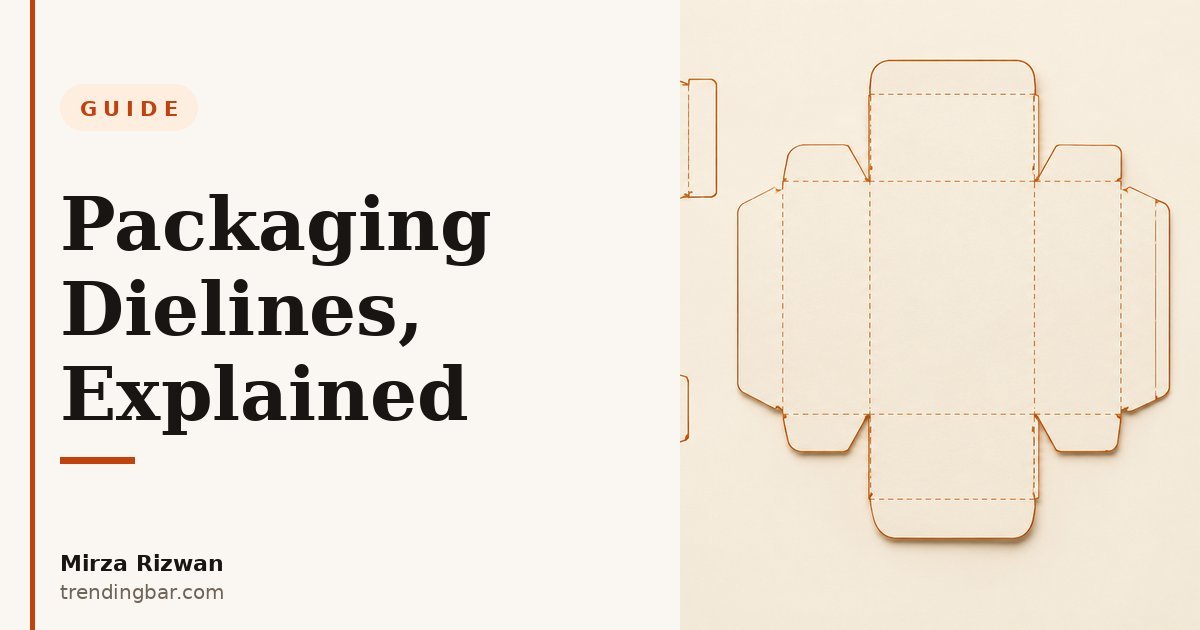
I want to start with something nobody tells founders: most packaging failures have nothing to do with design taste. They're file failures. A box that looks perfect on screen still becomes scrap if the artwork was built without a dieline, or on the wrong one, or on one the designer drew freehand. I've seen this more times than I can count, and the pattern is always the same: the dieline was treated as a technical detail for later. It's not. It's the foundation.
What is a dieline, really?
A dieline is the flat, vector-based blueprint of your package. Every cut, crease, perforation, and glue area, laid out in two dimensions. Think of it as the net of a 3D shape: cut along the solid lines, fold along the dashed ones, apply glue to the marked tabs, and the flat sheet becomes a box.
The term comes from the die-cutting process itself. A steel rule die is built to match the dieline, and the die-cutting machine presses that shape through the board. The same dieline doubles as the layout file for printing, so your graphics line up with the physical structure. One document, two jobs. That's why it's so central. Gamut Packaging puts it plainly in their dieline guide: a dieline is a template that shows all the cut and fold lines needed to create a three-dimensional package from flat material (gamutpackaging.com).
Who provides the dieline: you, your designer, or your printer?
Your printer or box supplier provides it, almost every time. This matters, so let me say it again: don't let your designer draw one from scratch unless there's genuinely no alternative. The converter supplies the dieline because it's matched to the physical cutting die they already own or will tool. Their dimensions are real; a guess is a guess.
The flow that works: you tell the supplier the box style and exact dimensions (and your product's actual measurements (not what you think they are)), they send back a dieline, usually as a PDF or AI file at real size, and your designer locks it as a background layer and builds artwork on top of it. My packaging design work always starts this way. When a founder hands me a supplier's dieline before we talk layout, I know the project is going to run clean. When they don't have one, my first job is getting one, not designing.
The anatomy of a dieline: what you're looking at
Open a dieline and it looks like a confusing technical drawing. It's not. Every line is one of a few simple things. Here's the full map:
| Line or zone | What it means | Typical marking |
|---|---|---|
| Cut line | Where the die slices all the way through the board. These define the outer edges of the box blank. | Solid line |
| Fold / score / crease line | Where the board is compressed but not cut, making a clean hinge. Fold along these. | Dashed line |
| Perforation | A tear-away line: easy-open strips, tear notches, tear-off coupons. | Dashed line (finer spacing), on its own layer |
| Glue area | Where adhesive goes. No ink here: ink on a glue tab means the glue won't bond. | Marked or shaded zone |
| Bleed | The extra 3mm (1/8 inch) of artwork past the cut line, so tiny cutting shifts never leave a white edge. | Outer boundary line |
| Safe zone | The inner margin where all critical text, logos, and legal copy must live so nothing gets trimmed. | Inner dashed boundary |
The color convention you'll see most often: red solid for cuts, blue dashed for folds, green for bleed, orange dashed for the safe area, purple for glue. It varies by shop, so always confirm with your printer. The logic is universal. As Teal Packaging's design guide says: "Design the structure first, then the artwork." (tealpackaging.com)
The file specs your printer will actually check
Printers run preflight checks on every incoming file, and these are the things that get jobs bounced back. Nail all of them and your file sails through.
- Bleed: 3mm (1/8 inch) on all sides. This is the single most common miss. Extend every background, image, and edge element a full 3mm past the cut line. BoxesGen's dieline reference confirms the industry standard: 3mm, roughly 1/8 inch, on all sides (boxesgen.com). Skimp here and the tiniest cutting shift exposes a white hairline. The classic "why does my box have white edges" complaint.
- Safe zone: keep everything important inside. Text, logos, barcodes, and legal copy stay comfortably inside the trim, well clear of folds and edges. A good rule: nothing critical within the safe margin, and never place text where a crease will run through it.
- CMYK, not RGB. Build the file in CMYK from the start. RGB is the light of a screen; converting late causes color shifts, especially in blues and greens. If you have a brand color that must hold across cartons and mailers printed months apart, specify a named Pantone spot ink instead of a CMYK build.
- 300 DPI at final size. Every image must be at least 300 dots per inch at the size it prints, not the size it appears on your monitor. VSL Print's file specs are blunt about it: lower resolution files produce soft, blurry printed results, period (vslprint.com). A web image dragged into a carton file is a guaranteed pixelated disaster.
- Outlined fonts, separate dieline layer. Convert all text to outlines so a missing font can't substitute or reflow anything. And the dieline itself must live on its own spot-color layer set to overprint or non-printing. Never flattened into the artwork. Supply Pack's spec sheet says it straight: don't embed dielines into artwork (supplypack.com).
The mistakes I see founders make (and how to avoid them)
Designing on a generic template downloaded from the internet, then hoping the structure matches later. This is the one I fight most. Generic dielines are fine for a mockup you'll show your cofounder. They're not fine for a die that costs real money to tool.
Another classic: approving the artwork from a screen mockup and skipping the physical proof. A 3D preview catches layout issues early: panels that fold the wrong way, text landing on a crease. But nothing replaces a folded dummy. Always request a printed proof before the full run. Always.
And here's the one with an opinion attached: too many founders obsess over finishes (foil, spot UV, embossing) before the structure is right. Finishes are the last 10% of a box. Dieline accuracy is the other 90%. I've seen beautiful premium-looking cartons fail because the glue flap was inked over and the seams popped open on a shelf. Nobody reads your packaging, and I mean that literally, they scan it in seconds. But they absolutely notice when it falls apart.
A simple workflow: dieline to shelf
Here's the order that works, every single time:
- Measure your actual product (widest point, cap or lid on) and add your tolerances.
- Ask your supplier for their dieline in PDF or AI, plus their file specs. Get this in writing.
- Brief your designer with the dieline, the product dimensions, and a plain list of what must appear on each panel.
- The designer builds artwork in layers on top of the locked dieline: art, type, finishes, each separated.
- Preflight: bleed, safe zone, CMYK, 300 DPI, outlined fonts, dieline on its own layer.
- Request a 3D mockup, then a folded physical proof. Approve the proof, not the screen.
- Print. Because the structure was right from the start, the print run is boring. Which is exactly what you want.
Design the structure first, then the artwork. The dieline isn't a technicality — it's the difference between a box that folds right the first time and a very expensive pile of misprinted board.
One last thing worth saying out loud. If you're budgeting for packaging design, know that the dieline stage is where the real cost savings hide. Every correction caught on the dieline costs nothing. Every correction caught on press costs a reprint. Founders who understand this distinction don't just save money: they launch on time.
That's the whole guide, really. The dieline is the box before it's a box. Respect it, and the rest of the process gets dramatically easier. Ignore it, and no amount of beautiful design on top can save you.
I'm Mirza Rizwan. I've spent 8 years designing packaging and Amazon creative at trendingbar.com, and dieline discipline is baked into every project I run. If you're not sure how to choose a packaging designer who'll get this right, my buyer's guide covers the questions to ask. And if you want a specialist who handles structure and artwork in one place, my packaging design services are built for exactly that. For a founder about to order boxes, the smartest move is a free second pair of eyes: grab my free packaging audit before you send anything to print.